📣 Avatars now in 7 languages + Buzzencer Art-to-Avatar
🌍 Your fans, all over the world. Avatars now support 7 languages
We have added Spanish, Portuguese (Brazil) and Vietnamese, bringing the total to 7 languages. Both the app interface and the Help Center are available in each of those languages.
Who this is for
Creators who want to widen their fanbase across the world
People who want to earn more with their own avatar
What gets better
Avatars go multilingual
Your avatar can now hold a conversation in languages other than Japanese. An avatar created in Japan, for example, can be enjoyed by a user in Brazil in their own language.
New fans around the world:
Share your avatar’s videos on social media and you can reach fans in countries that the language barrier used to keep out of reach.
More fans = more earnings:
On Twomi, earnings are generated when a fan joins one of your avatar’s Tiers. The wider your fans spread across the world, the greater your chance to earn.
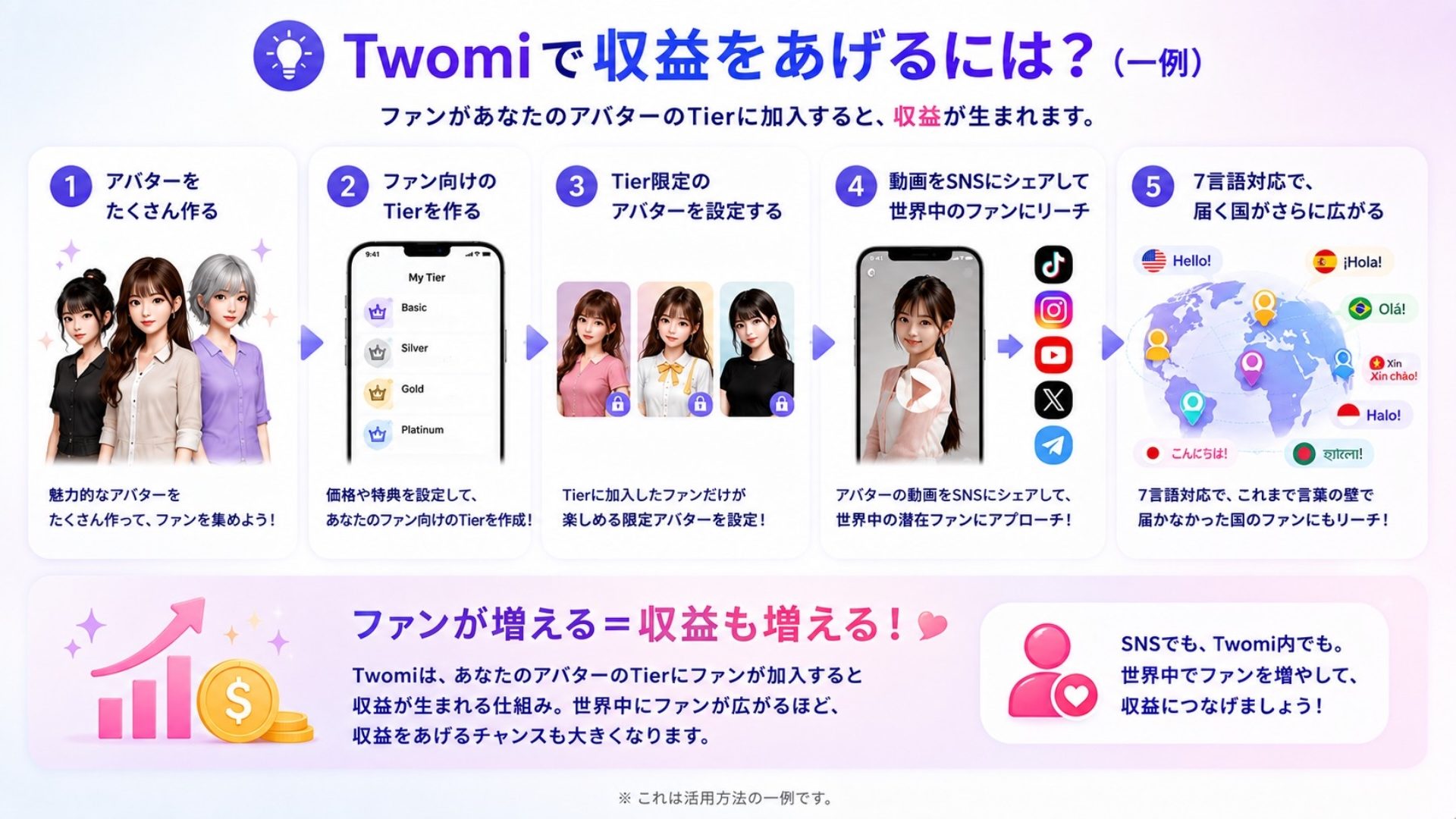
💡 How do you earn on Twomi? (one example)
Earnings are generated when a fan joins one of your avatar’s Tiers.
Create plenty of avatars
Create Tiers for your fans
Set up Tier-exclusive avatars
Share videos on social media to reach fans around the world
With 7 languages, the countries you reach widen further
On social media and inside Twomi alike. Grow your fans around the world and turn that into earnings.
※ This is one example of how the features can be used.
Languages currently supported: 🇯🇵 Japanese / 🇺🇸 English / 🇪🇸 Spanish / 🇧🇷 Portuguese (Brazil) / 🇻🇳 Vietnamese / 🇮🇩 Indonesian / 🇧🇩 Bengali
※ You can change the language at any time from Settings > Language.
🎨 Turn the art you bought straight into an avatar
For people who want to bring the works and character images they bought on Buzzencer to life as Twomi avatars
Now you can create from more than your device photos: until now an avatar could only be created from an image saved on your device, but you can now choose an art work you own on Buzzencer and create an avatar from it directly.
A “Purchased” tab added to your profile: art you bought on Buzzencer can be checked and viewed at any time from your profile screen in the Twomi app.
Create an avatar with one tap: just tap “Create an avatar with this art” on the art detail screen and the avatar creation process starts right away.
Ready for video generation immediately: the avatar you create is saved to My Avatars, so you can bring it to life in video generation straight away.
※ The “Purchased” tab appears only on your own profile (a linked Buzzencer account is required).
※ Creating from purchased art uses the same number of credits as creating from an ordinary photo.
Twomi is becoming an app that more people can enjoy in their own language.
And your favourite art is no longer only something to look at — you can now enjoy it as an avatar, just as it is.
We will keep delivering an easier and more enjoyable experience to users around the world. 🎬